PL-300
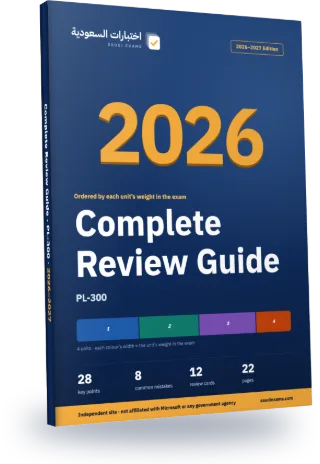
PL-300 Complete Review Guide 2026–2027
Every exam topic in a 22-page Arabic PDF, ordered from the heaviest unit to the lightest. The first three chapters alone cover about 83% of the exam questions.
- 22Pages
- 28Key points
- 8Common mistakes
- 12Flashcards
Guide map
Each chapter is one exam unit, ordered by its weight in the real exam.
| Chapter | Unit | Weight | Exam questions | Key points |
|---|---|---|---|---|
| 1 | Prepare the data | 28% | 14 | 7 |
| 2 | Model the data | 28% | 13 | 7 |
| 3 | Visualize and analyze the data | 28% | 14 | 7 |
| 4 | Manage and secure Power BI | 18% | 9 | 7 |
Chapter 1 in full: Prepare the data
28% of the exam, about 14 questions. These are its key points, as in the guide.
- Connect using the correct source connector; document credentials and privacy requirements before combining sources.
- Choose storage from requirements: Import stores a copy, DirectQuery queries a source, and Direct Lake is a Fabric-specific option. Check feature prerequisites rather than assuming all sources support all modes.
- Profile the relevant dataset scope before fixing errors. Distinguish null values, conversion errors and business-rule violations.
The rest of chapter 1, on this page
- Set data types deliberately and check locale when parsing dates or decimal separators. Keep the original values until you have validated the result.
- Use grouping to aggregate rows. Pivot creates columns from categories; unpivot turns repeated attribute columns into attribute-value rows.
- Merge combines tables using matching keys and a join kind. Append stacks rows; verify column names and compatible types.
- Build fact and dimension queries at a defined grain. Compare reference versus duplicate queries and turn off model loading for staging queries when appropriate.
Common mistakes in this chapter
- Do not remove every error row before checking whether the error reveals a source or locale problem.
- Append is not a key-based join. A reference query is not a guaranteed cached materialisation of its upstream result.
The other chapters are in the full guide
One purchase · lifetime access · review guide included
7-day review plan
The chapters are spread over 6 days by weight so each day carries a similar load. Day 7 is a full exam.
Day 1 · 28% of the exam
Chapter 1: Prepare the data
Day 2 · 28% of the exam
Chapter 2: Model the data
Day 3 · 28% of the exam
Chapter 3: Visualize and analyze the data
Day 4 · 18% of the exam
Chapter 4: Manage and secure Power BI
Day 5
Full mock exam: 50 questions in 100 minutes, then review the common mistakes in the units where you lost marks.
Before you read: see your score today
10 free questions from the main units, no sign-up. Then you know which chapter to start with.
Try 10 free questions and see your levelA look at each chapter
The first three key points of each chapter, as they appear in the guide (in Arabic in the PDF).
Chapter 1: Prepare the data
- Connect using the correct source connector; document credentials and privacy requirements before combining sources.
- Choose storage from requirements
- Profile the relevant dataset scope before fixing errors. Distinguish null values, conversion errors and…
Chapter 2: Model the data
- Start with the grain of the fact table. Use dimension attributes for grouping and…
- For each relationship check uniqueness, cardinality and cross-filter direction. Do not enable both-direction filtering…
- A role-playing dimension represents roles such as order date and ship date. Compare separate…
Chapter 3: Visualize and analyze the data
- Choose a visual to match comparison, trend, distribution or relationship questions. Avoid a decorative…
- Check visual, page and report filter scopes separately. Use conditional formatting to highlight meaning…
- Treat Copilot output as a draft to verify. Visual calculations operate on the visual…
Chapter 4: Manage and secure Power BI
- Separate workspace collaboration from audience distribution. Choose workspace access, direct sharing or an app…
- Distinguish reports, dashboards and apps. Configure app audiences and update the app when its…
- Subscriptions deliver scheduled updates; data alerts serve specific supported dashboard scenarios. Check which object…
The full guide comes with lifetime access
The full guide (22 pages) is included with lifetime access to this exam, together with every question and full mock exam. Chapter 1 is free for everyone.
Questions about the guide
Is the guide free?
Chapter 1 is free to read on the guide page. The full guide comes with lifetime access to this exam; 7-day access does not include it.
Is it up to date for 2026–2027?
Yes. Unit weights and exam facts follow what the exam body last published, and the last check date is printed in the guide. If the standards change we update the file and buyers download the new version.
Does the guide have questions?
No. The guide covers key points and common mistakes; scoring, weak-area practice and full mock exams are on the site.
Can I read it on my phone?
Yes. A5 pages in a single column, with chapters linked from the contents.
- Pages
- 22
- Edition
- 1448 AH · 2026–2027
- Language
- Arabic
- Last updated
Buy this exam
Pick the access that lasts until your test date.
Included
- Timed supplementary practice sessions: 50 questions in 100 minutes
- 500 questions, every option explained with its source
- Practice that starts with your weakest units, plus a review of your mistakes
- Complete Review Guide 2026–2027 (PDF), with lifetime access only
Continue with your Google account and you go straight to the payment page.
You pay on the Waffo Pancake checkout page (in English). The amount is in US dollars and your bank converts it to riyals. One payment with no automatic renewal, by Visa, Mastercard (a mada card with either logo works too), Apple Pay or Google Pay. Your statement shows "WAFFO". Purchases are not refundable.